A more recent discount on Quick Arc Launcher 2 was found.

Quick Arc Launcher 2
 (Android app)
KEICE SOFT
118 1K


Screenshots


Description
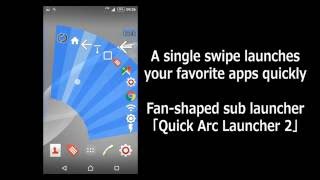
- This is a sub-launcher app which allows you to activate your favorite apps by a simple swiping.
- By using “Paging up”, you can add and arrange a lots of icons, and activate them quickly and smoothly.
This app is strongly recommended to people who are busy and tend to control a smartphone device in one hand !
* Free trial period for 30 days.
* Folding fan is popular in Japan and the fans.
Registration type:
✓ Application
✓ Shortcut
✓ Back, Home, History, Notification bar
✓ Flashlight On / Off
✓ Wi-Fi 、Bluetooth On/Off
✓ Recent applications that you use
✓ Media volume / mute
✓ Ringtone switching
✓ Brightness level
✓ Empty space
✓ Screenshot
✓ Feed page
Setting:
✓ Position of start area
✓ Quick Menu
✓ Landscape Enable / Disable
✓ Amount of drags to display launcher
✓ During keyboard display Enable / Disable
✓ Blacklist
✓ Change of fan of shape and color
✓ Change title
✓ Easy Setup
How to start :
1. To open a fan shape launcher by swiping your thumb at out of the side frames.
2. Release your thumb on an app which you would like to open.
Initial settings :
- Select “List”
- Tap “+” then you can add apps and shortcut function etc.
- If you would like to remove apps or shortcut from the list, hold down selected subject.
Usage of Page turning :
1. Select “List” and tap “Page feed”.
2. Insert a division
3. On the launcher picture, you can turn page by swiping “Page feed" icon.
Action (Turn back, Home, History, Notification) :
“Setting”-“Accessibility” and turn on this app.
”Blacklist”, “Recent Apps” and “Add App presently used to list” :
“Setting”-“Security”-“Apps with usage access” and turn on this app.
Recent App :
- “Recent App” is listed from the top.
- Android OS is programmed to reset “Recent App” once in a day.
Screenshots :
- Storage folder: “Internal Storage”-“Pictures”-“Screenshots”
- “Status bar” and “Navigation Bar” don’t appear when the display is set landscape mode.
- You can’t take “Quick Arc Launcher 2”’s screenshot.
- This app may not be able to function properly depending on a device’s model. When you find an issue, please refrain from using this app.
FAQ :
Q1. How to purchase the application?
A1. From the main screen, tap “Menu”. Tap “Subscribe to the retail version” and install Quick Arc Launcher 2 on your device.
Q2. How to hide “Quick Arc Launcher 2” from “Notification” and “Status bar”?
A2. Open Android OS “Setting”.
Select “Quick Arc Launcher 2” and find app’s information.
Set the Notification turned off.
Q3. How to avoid operation mistake?
A3. “Dragging Level to open Launcher” is adjustable.
- Setting the start area narrower
- Setting the angle of the fan bigger
- Using blacklist
All of the above are also recommended.
Media (in Japan) :
2016/10/02(update) Appliv: Launcher Ranking Third place.
http://android.app-liv.jp/customizations/launchers/0074/
2016/02/01 Appliv
http://android.app-liv.jp/002609141/
2016/03/31 Weekly ASCII AndroidPLUS
http://android.ascii.jp/2016/03/30/784546454/
2015/08/06 Mobile WATCH
http://k-tai.impress.co.jp/docs/ranking/androider/20150806_715202.html
2015/03/15 Okutoba
http://octoba.net/archives/20150315-android-app-quickarclauncher-416042.html
Facebook :
https://www.facebook.com/QuickArcLauncher
Webpage :
https://sites.google.com/site/keicesoften/
Feedback and Comment :
We appreciate if you give us any feedback about this app.
- An anonymous comment is accepted.
http://goo.gl/forms/ptvuprEjaFV15yM72
